

Rent Ledger: What It Is, Free Template, Example & How to Create One
One missed entry can turn a simple rent payment into a confusing dispute. A rent ledger helps you see what was charged, what arrived, and what balance remains—without piecing together bank statements, texts, and receipts. Whether you manage one rental home or several units, a clear record can make rent collection easier to monitor and payment questions simpler to resolve. In this guide, you’ll learn what a rent ledger should include, how to create one in Excel or Google Sheets, and how to record partial payments, fees, credits, and corrections. Use the example to build a dependable rental record.
A rent ledger is a record of rent charges, payments, fees, credits, and outstanding balances for a rental property or tenancy. It helps landlords track who has paid, identify overdue rent, resolve payment disputes, and organize rental income records. Tenants can also use a rent ledger to document their payment history.
You can create a rent ledger using a notebook, printable form, Excel spreadsheet, Google Sheets, or property management software. For most small landlords, a simple spreadsheet with a running balance is an effective place to start.
This guide explains what a rent ledger should include, provides a copy-ready template, walks through a real-world example, and shows you how to handle partial payments, corrections, and monthly reconciliation.
Quick Answer: What Is a Rent Ledger?
A rent ledger is a chronological record of every financial transaction associated with a tenant’s rental account. It typically shows the rent charged, payment dates, amounts received, additional fees, credits, and the remaining balance.
Landlords use it to monitor rent collection and maintain financial records. Tenants can use their own records to verify payments and help resolve disagreements about outstanding rent.
What Does a Rent Ledger Show?
A rent ledger shows the financial history of a rental agreement, from the beginning of the tenancy to the current date or move-out.
Unlike a collection of individual payment receipts, it brings charges and payments together in one record. You can follow each transaction and see how the tenant’s balance changes over time.
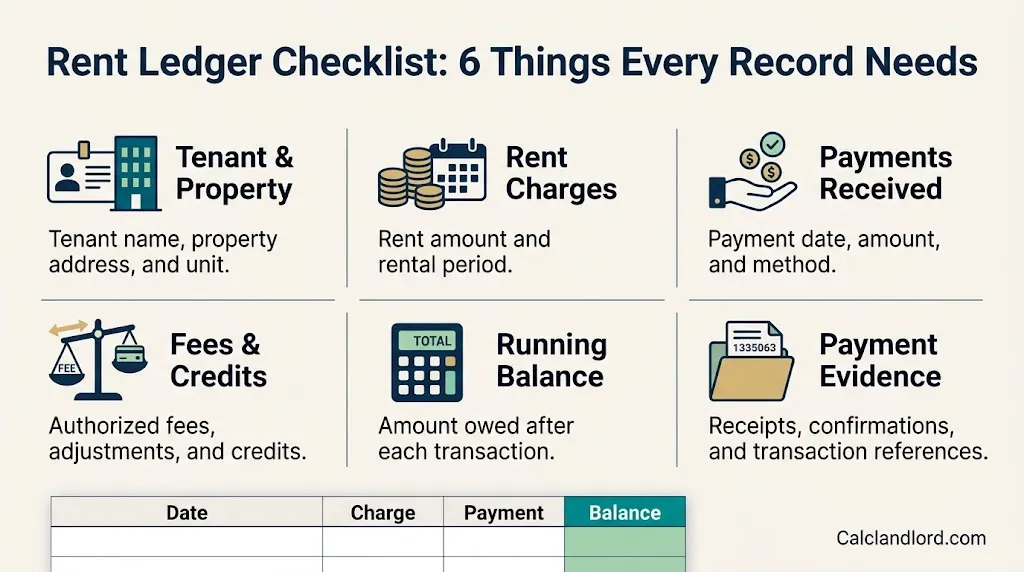
A typical rent ledger tracks:
- Rent charges: The amount of rent billed for each rental period.
- Payments received: The amount paid by the tenant and the date the payment was received.
- Additional charges: Applicable late fees, parking charges, pet rent, and other lease-authorized amounts.
- Credits and adjustments: Approved credits, refunds, waived fees, and corrections.
- Outstanding balance: The amount still owed after each transaction.
- Payment details: The payment method, transaction reference, or receipt number.
- Notes: Explanations for partial payments, returned payments, payment plans, or unusual transactions.
The most useful feature is the running balance. It allows a landlord to see whether an account is current, overdue, or in credit without reconstructing the payment history from separate documents.
For example, if a tenant owes $1,600 and pays $1,000, the ledger should show the $1,000 payment and the remaining $600 balance.
The record should reflect what actually happened, not what the landlord expected to receive.
Rent Ledger Example: A Tenant Paying $1,500 Per Month
Consider a hypothetical landlord who charges $1,500 in monthly rent. The tenant pays January and February in full, but March rent is paid in installments.
For illustration, the following example assumes the $50 late fee is authorized by the lease and permitted under applicable law.
| Date | Description | Charge | Payment | Balance Owed |
| Jan. 1 | January rent charged | $1,500 | — | $1,500 |
| Jan. 3 | January rent received | — | $1,500 | $0 |
| Feb. 1 | February rent charged | $1,500 | — | $1,500 |
| Feb. 5 | February rent received | — | $1,500 | $0 |
| Mar. 1 | March rent charged | $1,500 | — | $1,500 |
| Mar. 7 | Late fee applied | $50 | — | $1,550 |
| Mar. 9 | Partial payment received | — | $1,000 | $550 |
| Mar. 15 | Remaining balance received | — | $550 | $0 |
This example demonstrates why a rent ledger must record more than whether a tenant has paid.
The March account goes through several stages: rent is charged, a fee is applied, a partial payment is received, and the remaining balance is cleared.
If the landlord recorded only the final $1,000 payment without accounting for the original charge and subsequent transactions, the payment history would be incomplete.
Important: Late fees and other charges should be entered only when properly authorized by the lease and applicable law. Fee limits, grace periods, and other landlord-tenant requirements differ by jurisdiction.
Free Rent Ledger Template for Excel and Google Sheets
You can build a basic rental ledger without purchasing accounting software.
Copy the following table structure into Excel or Google Sheets. Use one worksheet or tab for each tenancy, and add a separate row for every charge, payment, or credit.
| Column | Information to Record |
| Date | Date of the charge, payment, or adjustment |
| Rental Period | Month or period the transaction applies to |
| Description | Rent charge, payment, fee, credit, or correction |
| Charge | Amount billed to the tenant |
| Payment/Credit | Money received or credit applied |
| Payment Method | ACH, check, money order, card, or other method |
| Reference | Transaction ID, check number, or receipt number |
| Running Balance | Amount owed after the transaction |
| Notes | Explanation of unusual entries |
Copy-ready rent ledger headings
For a blank spreadsheet, use these headings in the first row:
Date | Rental Period | Description | Charge | Payment/Credit | Payment Method | Reference | Running Balance | Notes
Add the tenant’s name, property address, unit number, lease dates, monthly rent, and rent due date above the table or in a separate information section.
Keep sensitive tenant information secure and share the ledger only with people who are authorized to access it.

Rent ledger formula for Excel
A running balance is calculated by adding new charges and subtracting payments or credits.
Formula:
NewBalance=PreviousBalance+Charge-PaymentorCredit
Suppose your spreadsheet uses these columns:
- Column D: Charge
- Column E: Payment/Credit
- Column H: Running Balance
If the opening balance is zero and your first transaction is in row 2, enter this formula in cell H2:
=D2-E2
For the next transaction in row 3, enter:
=H2+D3-E3
Drag the second formula down the balance column to calculate subsequent transactions.
If you begin with an existing unpaid balance, record that opening balance as the first entry or include it in the opening calculation. Do not start the ledger at zero when the tenant already owes money.
How to interpret the running balance
A positive balance means the tenant owes money under this ledger’s convention. A zero balance means the recorded charges have been paid or credited in full. A negative balance indicates an overpayment or credit.
For example:
| Previous Balance | New Charge | Payment | New Balance |
| $0 | $1,500 | $0 | $1,500 |
| $1,500 | $0 | $1,000 | $500 |
| $500 | $0 | $500 | $0 |
| $0 | $0 | $100 | -$100 |
The final row illustrates a $100 overpayment. The landlord should verify how it occurred and document the resulting credit rather than silently applying it to another month.
What Information Should a Rent Ledger Include?
A useful rent ledger contains enough information to explain the account without forcing someone to search through messages, bank statements, or old receipts for every transaction.
1. Tenant and property information
Start with the identifying details:
- Tenant’s full name and any co-tenants named on the lease.
- Property address and unit number.
- Lease start and end dates.
- Monthly rent amount.
- Rent due date.
- Lease or account reference, if used.
This information helps prevent payments from being assigned to the wrong unit or tenant.
2. Rent charges and payment dates
Record each charge and payment separately, using the actual transaction dates.
For instance, if April rent is due on April 1 but received on April 6, record the rent charge and payment as separate entries. This preserves both the amount billed and the date the payment was received.
Also record the rental period to which the payment applies. A payment received in May might cover May rent, overdue April rent, or an agreed payment plan.
3. Additional charges and credits
A tenant account may include transactions beyond monthly rent, such as:
- Pet rent or pet-related charges authorized by the agreement.
- Parking or storage charges.
- Utility reimbursements.
- Lawfully imposed late fees.
- Returned-payment fees, when permitted.
- Approved rent concessions.
- Refunds and adjustments.
- Other lease-authorized amounts.
Describe each transaction clearly instead of grouping unrelated charges into a single unexplained amount.
Keep refundable security deposits separate from rent income. A separate deposit register or clearly segregated deposit account makes it easier to distinguish money held for the tenant from rental revenue. Federal tax treatment depends on the nature and handling of the deposit; see the IRS guidance on rental income.【turn515888search6】
4. Payment references and supporting records
Where available, preserve the check number, bank transaction ID, payment-platform reference, or receipt number.
A ledger summarizes the account. Supporting documents help verify the transactions behind it. Retain relevant lease documents, payment confirmations, receipts, bank records, and written agreements.
- Explore More: https://calclandlord.com/how-to-rent-your-house/
How to Create a Rent Ledger Step by Step
Follow this process to create a ledger that is straightforward to maintain and easier to verify.
Step 1: Choose a ledger format
Select a format that matches the size of your rental operation.
A printable sheet may be sufficient for one unit. A spreadsheet is often more convenient when you want automatic balance calculations. Property management software becomes more useful when you manage many leases or need automated charges and payment reports.
Step 2: Create a separate account for each tenancy
Create a dedicated ledger or account for every tenant, lease, or rental unit.
For example, a landlord who owns a duplex should maintain separate tenant ledgers for Unit A and Unit B. The two ledgers can feed into a broader property accounting report, but their individual transaction histories should remain distinguishable.
This is particularly important when tenants pay different amounts or have separate lease agreements.
Step 3: Enter the lease terms
Record the monthly rent, due date, lease term, tenant names, property address, and applicable recurring charges.
Use the signed lease and any valid written amendments as the basis for the entries. If rent changes during the tenancy, document the effective date and the supporting agreement.
Step 4: Enter every charge and payment
Create a new row whenever a charge, payment, credit, or correction occurs.
Record actual amounts rather than estimates. If a payment is pending, do not mark it as received simply because the tenant says it has been sent. Confirm receipt through the appropriate payment records.
Step 5: Update the running balance
After every entry, calculate the new balance using the previous balance plus charges minus payments and credits.
Review the result when entering a partial payment or a fee. These transactions are common sources of mistakes because the account may remain partially unpaid even after money has been received.
Step 6: Reconcile the ledger monthly
Compare the ledger with bank deposits, checks, money orders, payment-platform reports, or other relevant records.
Look for missing transactions, duplicate entries, returned payments, incorrect amounts, and payments assigned to the wrong month.
Step 7: Save supporting documents and backups
Store payment confirmations and other relevant documents with appropriate account references so each transaction can be traced.
Protect digital files with access controls and secure backups. Establish a record-retention process that takes applicable tax, legal, and business requirements into account.
How to Record Partial Rent Payments Correctly
Partial payments deserve particular attention because they can leave a tenant with an outstanding balance even when money has been received.
Suppose monthly rent is $1,400. The tenant pays $700 on April 8 and the remaining $700 on April 20.
| Date | Description | Charge | Payment | Balance Owed |
| Apr. 1 | April rent charged | $1,400 | — | $1,400 |
| Apr. 8 | Partial payment received | — | $700 | $700 |
| Apr. 20 | Remaining payment received | — | $700 | $0 |
The ledger should show the entire rent charge and both payments.
Do not mark April as fully paid when the first $700 arrives. Doing so understates the balance and creates an inaccurate payment history.
What if a tenant makes several small payments?
Record each payment separately, including its date and reference where available.
For example, if a tenant pays $300, $250, and $150 toward a $1,000 outstanding balance, the ledger should show all three payments and the remaining $300 balance.
Also document how each payment was allocated if the tenant owes rent for multiple periods or has several outstanding charges. Follow applicable law and any governing agreement when allocating payments; do not assume that every jurisdiction permits the same allocation method.
What if a payment is returned or reversed?
A payment that initially appears successful may later be returned by the bank or reversed by the payment provider.
When this happens, preserve the original entry and add a dated reversal or correction entry. Include the reason and any relevant reference.
The ledger should reflect the final financial position while retaining an understandable transaction history.
How to Reconcile a Rent Ledger With Bank Records
Monthly reconciliation is the process of checking whether the transactions in your rent ledger agree with the supporting financial records.
A ledger can contain accurate-looking balances and still be wrong if a payment was entered twice or never recorded.
Use this checklist each month:
- Compare every recorded payment with the corresponding deposit, check, or payment confirmation.
- Confirm that payments have been assigned to the correct tenant and rental period.
- Investigate missing deposits, duplicate entries, returned payments, and differences in amounts.
- Check whether credits and approved adjustments were applied correctly.
- Verify that the closing balance agrees with the transaction history.
- Save evidence of any corrections and retain the completed reconciliation record.
For example, if the rent ledger shows $3,000 collected from two tenants but the corresponding bank records account for only $2,500, investigate the $500 difference rather than assuming the ledger is correct.
Possible explanations include a payment entered prematurely, a returned payment, an incorrect amount, or a deposit that has not yet appeared in the records.
Reconciliation helps identify the issue before it affects financial reporting or a tenant dispute.
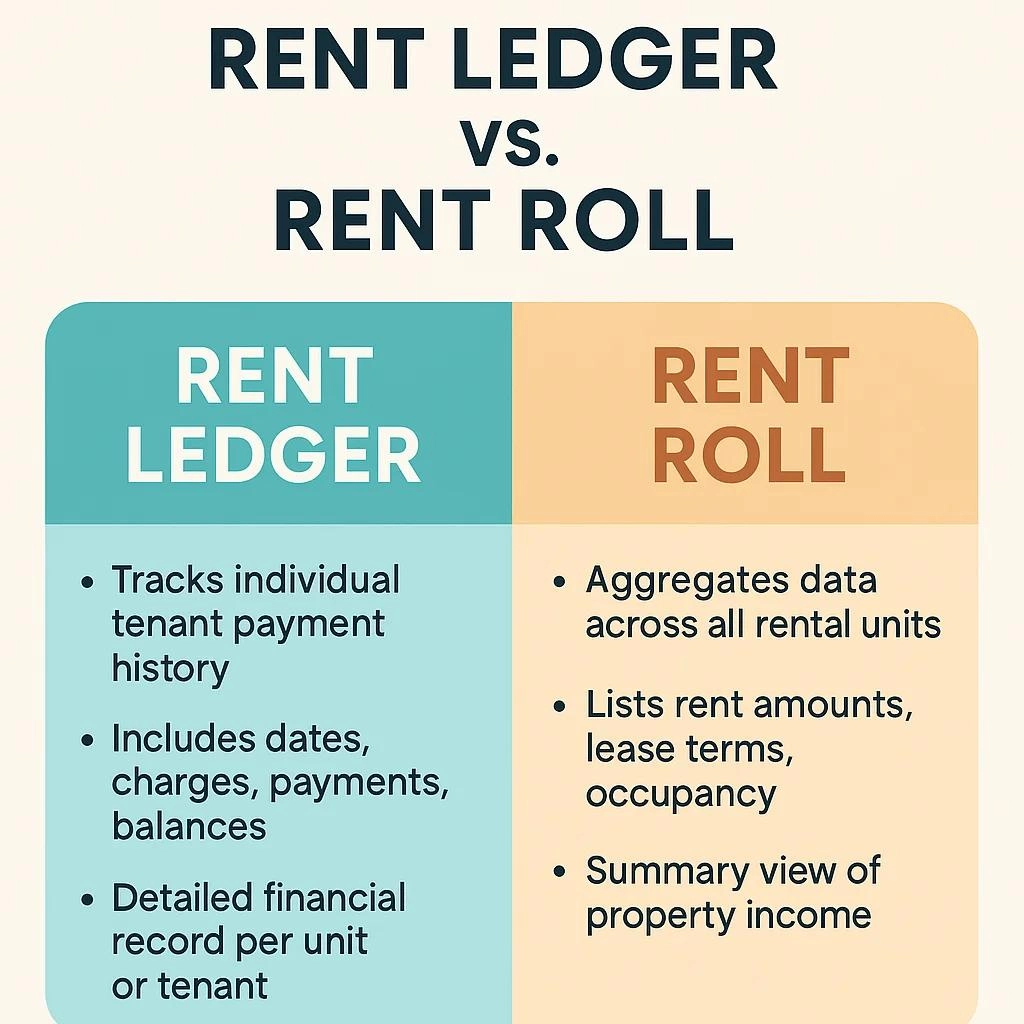
Rent Ledger vs. Rent Receipt vs. Rent Roll
These three records serve different purposes. Using the right one makes rental accounting easier to understand.
| Feature | Rent Ledger | Rent Receipt | Rent Roll |
| Primary purpose | Track an individual tenant’s financial history | Document a specific payment | Summarize rental units and leases |
| Main contents | Charges, payments, credits, balances | Payment amount, date, and details | Rent amounts, occupancy, lease terms |
| Time coverage | Ongoing transaction history | One payment | Usually a current snapshot |
| Shows outstanding balance | Yes, if maintained properly | Not normally | May summarize arrears depending on the report |
| Best use | Account tracking and reconciliation | Proof of an individual payment | Property and portfolio analysis |
A rent receipt answers, “Was this payment received?”
The rent ledger answers, “What has been charged, what has been paid, and what remains outstanding?”
A rent roll answers, “What rents, leases, and occupancy do I have across my property or portfolio?”
For example, a landlord managing a 20-unit apartment building might review the rent roll to understand the overall property, then open an individual tenant ledger to investigate a disputed balance.
Why Landlords Need a Rent Ledger
A rent ledger supports day-to-day property management by keeping financial information organized and traceable.
Track overdue rent
A current ledger helps landlords identify unpaid balances early. It makes it easier to determine which tenants need a reminder or account review rather than relying on memory.
Resolve payment disputes
If a tenant says rent was paid, the ledger provides a starting point for checking the date, amount, payment method, and balance.
Payment confirmations and bank records can help establish what happened when the ledger and tenant’s records do not agree.
Organize rental income for tax reporting
Landlords need reliable records of rental income and expenses when preparing tax returns.
The IRS recommends maintaining records that track rental income and expenses and support amounts reported on tax returns.【turn515888search3】
A rent ledger can help organize rent receipts by property and tenant, but it does not replace expense receipts, invoices, bank records, or other required supporting documentation.
The appropriate tax treatment and timing can depend on the accounting method and the details of the transaction. Consult IRS Publication 527 or a qualified tax professional for your circumstances.【turn515888search1】
Monitor rental cash flow
A landlord can use ledger totals to see the difference between rent charged and rent collected.
That information is useful, but it should not be confused with net rental cash flow. Actual property cash flow must also account for expenses, financing, vacancy, and other relevant outflows.
Support legal and administrative documentation
An accurate ledger may help organize the payment history for a dispute or a nonpayment proceeding.
However, a rent ledger does not automatically establish that every legal requirement has been met. Notice requirements, payment-allocation rules, permitted fees, court forms, and eviction procedures vary by jurisdiction. Landlords should verify local requirements and seek qualified legal assistance when necessary.
Why Tenants Should Keep a Rent Ledger
A rent ledger is useful for tenants as well as landlords.
A tenant who keeps an independent payment history can compare it with the landlord’s records, spot discrepancies, and locate evidence when questions arise.
A tenant’s own ledger can record:
- The rental period and amount due.
- The payment date and amount paid.
- The payment method and transaction reference.
- The landlord’s receipt or confirmation, where available.
- Any credit, adjustment, or disputed charge.
- The remaining balance according to the tenant’s records.
For example, a tenant who pays $900 through a payment app should retain the transaction confirmation and record the month the payment was intended to cover.
If the landlord’s ledger does not show the payment, both parties can compare their records and investigate the discrepancy.
A tenant can also ask the landlord or property manager for a copy of the account history. Whether the landlord is legally required to provide one, and the applicable deadline, depends on the jurisdiction and circumstances.
Paper Ledger vs. Spreadsheet vs. Property Management Software
The best rent ledger format is the one you can maintain accurately and consistently.
| Method | Best For | Advantages | Limitations |
| Printable rent ledger | One or a few rental units | Simple, inexpensive, usable offline | Manual calculations and physical storage |
| Excel or Google Sheets | Small landlords and independent owners | Customizable fields and automatic formulas | Requires manual entry and careful backups |
| Property management software | Growing portfolios | May automate charges, payments, reminders, and reporting | Cost, configuration, and data-management considerations |
When is a spreadsheet enough?
A spreadsheet is often a practical starting point for a landlord with a small number of units.
It offers control over the columns, supports running-balance formulas, and makes it relatively easy to export or print a tenant statement.
Its main weakness is that the landlord must enter transactions correctly and reconcile them with source records.
When should you consider software?
Property management software becomes more attractive when you manage multiple properties, recurring charges, frequent partial payments, online collections, or owner reporting.
Before choosing a platform, check whether it supports separate tenant accounts, detailed transaction histories, corrections, exports, and the reports you actually need.
Do not assume that software automatically produces accurate records. The underlying data still needs to be entered, reviewed, and corrected appropriately.
Common Rent Ledger Mistakes to Avoid
Small errors can accumulate and make a tenant’s balance difficult to explain. Avoid these common problems.
Recording payments without rent charges. A ledger that contains only incoming money cannot reliably show what the tenant was expected to pay or what remains outstanding.
Marking partial payments as full payments. Record the amount received and carry forward any remaining balance.
Mixing security deposits with rent income. Track refundable deposits separately so they are not mistakenly included as rental revenue.
Combining multiple tenants in one account. Keep individual histories distinguishable, even when several units belong to the same property.
Forgetting the rental period. A payment date alone may not tell you which month’s rent was paid.
Applying unauthorized fees. Record additional charges only when supported by the governing agreement and applicable law.
Deleting errors without an audit trail. Use dated, documented corrections or reversals instead of silently erasing earlier entries.
Ignoring reconciliation. Compare ledger records with supporting payment and banking records regularly.
Keeping no supporting evidence. Preserve receipts, bank confirmations, leases, and relevant written communications.
Sharing tenant information carelessly. Protect personal and financial information with appropriate access controls.
Rent Ledger Best Practices for Landlords
Use the following routine to keep records consistent:
- Update the ledger whenever a charge, payment, credit, or correction occurs.
- Maintain a separate account for each tenancy.
- Use consistent descriptions and column headings across properties.
- Record both the transaction date and rental period.
- Document partial payments and outstanding amounts accurately.
- Keep refundable security deposits separate from rent income.
- Reconcile the ledger with financial records monthly.
- Retain supporting documents and secure backups.
- Correct errors transparently without obscuring the original transaction.
- Follow the lease and applicable state and local requirements when imposing fees or handling payment disputes.
Consistency matters more than having a complicated ledger. A straightforward record that is updated regularly is more useful than a detailed spreadsheet that is left incomplete for several months.
People Also Ask About Rent Ledgers
A rent ledger documents the charges, payments, credits, and balance recorded for a tenancy. It can help explain a payment history, but its reliability depends on the accuracy of the entries and the supporting evidence. A ledger alone does not guarantee that a legal dispute will be decided in a particular way.
Ask the landlord or property manager for a copy of your rent payment history or tenant account statement. Include the property address and the period you need. If there is a disagreement, identify the specific payment or charge in question and provide any relevant confirmations you have. The legal right to obtain a ledger varies by jurisdiction.
Yes. Create columns for date, rental period, description, charge, payment or credit, payment method, reference, running balance, and notes. Use a running-balance formula to add charges and subtract payments. Reconcile the spreadsheet with the underlying transaction records regularly.
The terms are often used interchangeably. A rent ledger generally emphasizes the rent and related charges associated with a tenancy, while a tenant ledger may include a broader range of account transactions. The exact distinction depends on how the landlord or property manager defines the records.
There is no single universal rule that establishes the same rent-ledger format for every U.S. landlord. Recordkeeping, tenant access, court documentation, and related requirements depend on the applicable federal, state, and local rules and the specific circumstances. Landlords should confirm their obligations for each property.
Additional Rent Ledger FAQs
How often should a rent ledger be updated?
Ideally, update the ledger as each charge or payment occurs. Monthly reconciliation is a useful minimum routine for identifying discrepancies, although higher transaction volumes may require more frequent checks.
How long should a landlord keep rent ledgers?
The appropriate retention period depends on the records involved, applicable tax rules, state and local law, and any pending disputes or proceedings. Follow the relevant retention requirements and ask a qualified tax or legal professional when the correct period is unclear.
Should security deposits be included in a rent ledger?
Refundable security deposits should be tracked separately from ordinary rent income. Maintain a distinct deposit register or clearly segregated accounting record so the amount held for a tenant can be identified and reconciled. The federal tax treatment depends on the deposit’s terms and handling, as explained in IRS Topic No. 414.【turn515888search6】
Can a rent ledger help with rental assistance applications?
It may help document the rent charged and payment history, but the program or agency may require a specific form, lease, landlord statement, payment verification, or other documentation. Check the requirements of the particular program rather than assuming that a ledger alone will be sufficient.
How do I correct a mistake in a rent ledger?
Preserve the original transaction history and add a dated correction or reversal entry. Explain the reason in the notes, update the running balance, and retain any supporting evidence. This creates a clearer record of what changed and why.
Conclusion: Keep Your Rent Ledger Accurate and Up to Date
A rent ledger is one of the simplest ways to make rental payment tracking more reliable. It brings rent charges, payment history, authorized fees, credits, and outstanding balances into one organized record.
For a landlord with a few rental units, a well-designed Excel or Google Sheets template may be sufficient. Larger portfolios may benefit from property management software, particularly when recurring charges and payment reporting become more complicated.
Start with the free template structure in this guide, record every transaction accurately, and reconcile your entries with supporting records each month.
Most importantly, make sure the ledger reflects the actual account history. A consistent, transparent record helps landlords monitor rent collection and gives tenants a clearer way to verify payments and address discrepancies.

Pingback: BNBCalc Review: 10 Critical Checks Before You Invest