

Rentometer Free: What You Actually Get and How to Check Rent for Free
You’ve probably seen “Rentometer free” in a search bar and wondered whether it’s really free. The short answer is yes, with limits. You can run a rent estimate without paying or entering a credit card, but the free version is a trial, not an open-ended tool. Once the trial runs out, the detailed comps and bulk features sit behind a paid plan. That leaves most landlords and investors asking the same follow-up question: how do I get a rent number I can defend without paying for every check? This guide answers that question. You’ll see what the free tier covers, why estimates can differ from what a unit actually leases for, and how to build a reliable free rent estimate in about 15 minutes.
Rentometer has a free tier, so yes, you can get a rent estimate without paying. But the free version is a limited trial, not an open-ended tool, and its allowances change from time to time. This guide covers what the free version gives you, what it leaves out, how much weight to put on its numbers, and how to build a defensible rent estimate yourself at no cost.
Quick Answer
Rentometer’s free access lets you run a small number of rent estimates and try a limited set of detailed reports, with no credit card required. Its sign-up page describes a short trial window, so check the current terms on Rentometer’s site before you sign up. For ongoing rent analysis, you’ll need a paid plan or a manual method.
What Rentometer Does
Rentometer estimates market rent from a property address, the number of bedrooms, and the rent you’re considering charging. The free QuickView estimate gives you a quick figure based on nearby rental data, along with a sense of how your proposed rent compares to the local market.
The paid Pro tier adds more depth: detailed property reports, rent history, and batch analysis for multiple properties at once.
Landlords use it to price a vacant unit. Renters use it to check whether a renewal offer is reasonable. Investors use it as a first pass before running the numbers on a deal.
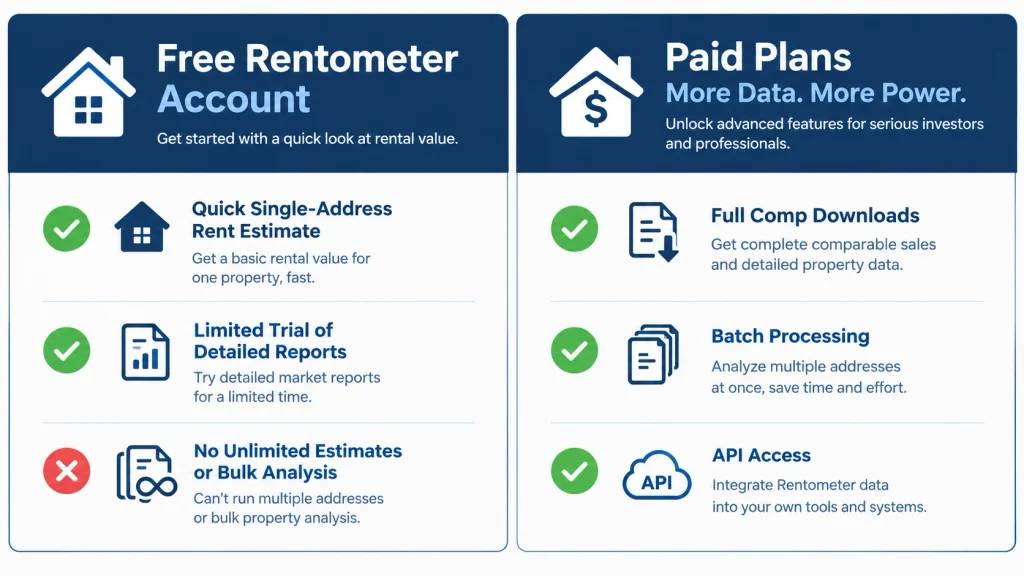
What the Free Version Includes
The free version is built to show you the basics. You get a QuickView estimate for a single address, and you may get a small number of Pro Reports with comparable rentals during the trial. Pro Reports are where you can look at the comps behind the estimate, which matters more than the headline number.
The free version does not give you unlimited estimates, bulk processing, rent history, or API access. Those features sit behind paid plans.
Because the trial window is short, decide in advance which property you want to test. Save the estimate, the date you ran it, and any comp details before the access window closes.
How to Get the Most From a Free Estimate
Use the free allowance carefully. Here’s a workflow that gets you the most useful information from a single estimate.
- Pick the property that matters most. Don’t spend your free runs on casual curiosity.
- Enter the full street address. A ZIP code is too broad for a precise rent figure.
- Enter the bedroom count accurately. Rentometer’s estimate depends heavily on it.
- Enter the rent you’re considering. This lets you see where your planned rent falls relative to the estimate.
- Save the result. Take a screenshot or note the number, the date, and the comps.
- Validate it. Treat the estimate as one input, not the answer. The next sections explain how.
How Accurate Are Rentometer’s Estimates?
Rentometer’s estimates are a useful starting point, but they reflect the data they’re built on, and that data doesn’t always match what a specific unit will rent for.
A few factors create the gaps:
- Asking rent and signed rent are different. Listings show what landlords ask. Tenants often negotiate, and concessions can lower the effective rent.
- Averages and medians tell different stories. A handful of expensive listings can pull an average up. A median is usually a more stable benchmark.
- Boundaries matter. A neighborhood, a ZIP code, and a city can produce meaningfully different figures.
- Condition and features move rent. A renovated kitchen, in-unit laundry, parking, or outdoor space can outweigh a small difference in square footage.
Estimates are most reliable in markets with plenty of rental activity and least reliable for unusual properties, rural areas, or units with significant differences from the typical rental nearby.
The Three-Source Check
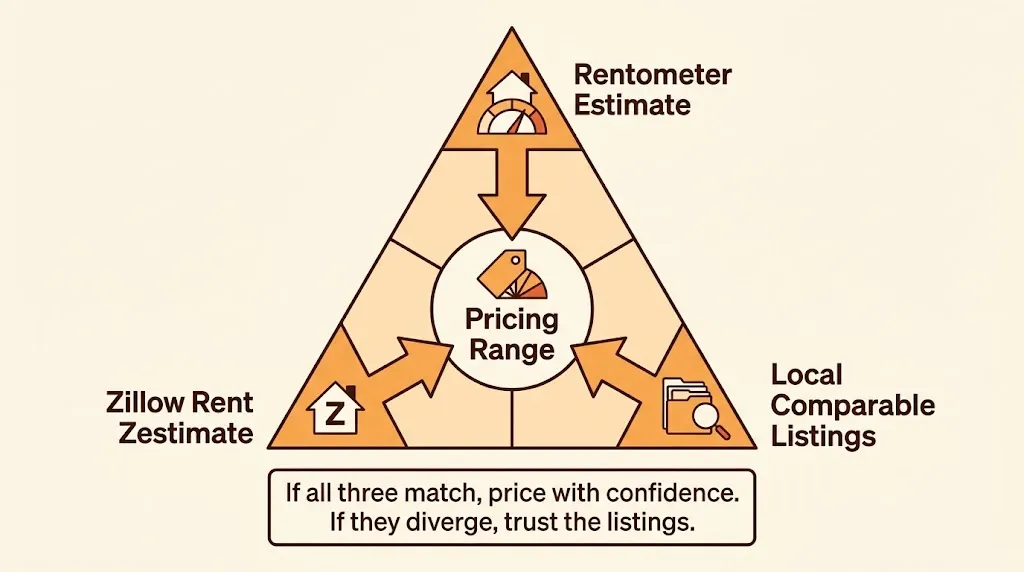
Before you set rent or make a purchase decision, compare three inputs:
- Rentometer’s free estimate for the address.
- Zillow’s Rent Zestimate or another address-level estimate.
- Three to five current local listings with similar bedrooms, bathrooms, size, and condition.
If all three land in a similar range, you have a reasonable basis for pricing. If they diverge sharply, trust the listings you’ve reviewed manually. You can see exactly why those listings differ, which an automated number can’t tell you.
How to Build a Free Rent Estimate Yourself
A manual comp analysis takes about 10 to 20 minutes per property and gives you control over the variables that automated tools generalize away.
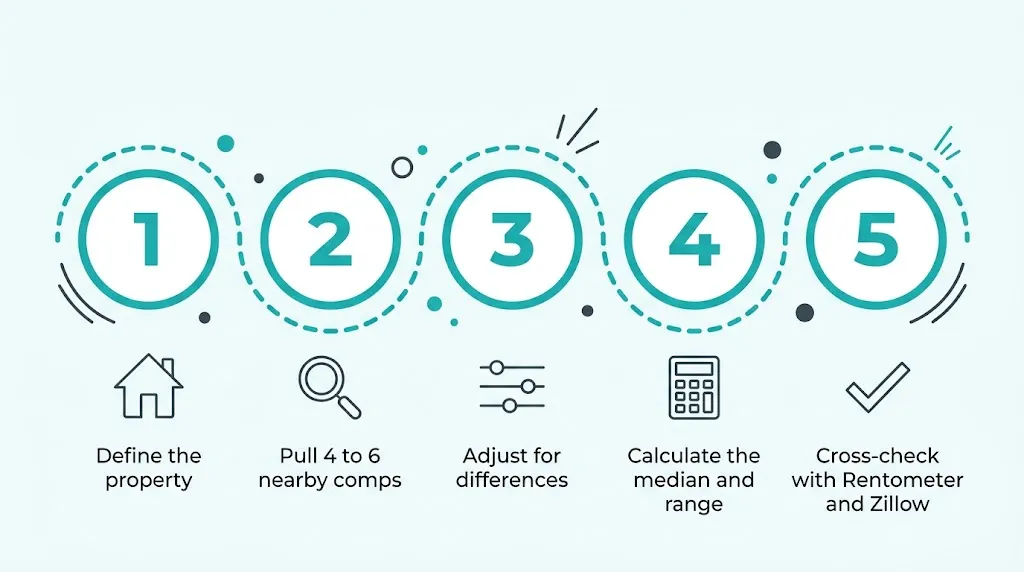
Step 1: Define your property. Note the address, property type, bedrooms, bathrooms, square footage, parking, laundry, pet policy, condition, included utilities, and lease term.
Step 2: Find four to six comparable listings. Search Zillow, Apartments.com, Craigslist, Facebook Marketplace, or local rental sites within about a mile. In dense urban areas, a narrower radius works better. Favor listings posted in the last 30 to 60 days.
Step 3: Adjust for differences. A comp with in-unit laundry should be adjusted down if your unit lacks it. A comp with a renovated kitchen should be adjusted down if yours isn’t renovated. Assign a reasonable dollar amount to each meaningful difference. These adjustments are judgment calls, so be consistent and explain your reasoning to yourself.
Here’s an example for a 2-bedroom, 1-bath, 850-square-foot unit with no in-unit laundry and an original kitchen. The adjustments are illustrative, not market data.
| Comparable | Asking rent | Adjustment | Adjusted rent |
| A: 2bd/1ba, 820 sq ft, in-unit laundry | $1,850 | −$75 | $1,775 |
| B: 2bd/1ba, 900 sq ft, renovated kitchen | $1,900 | −$100 | $1,800 |
| C: 2bd/1ba, 780 sq ft, no laundry | $1,700 | +$50 | $1,750 |
| D: 2bd/1ba, 850 sq ft, no laundry | $1,750 | $0 | $1,750 |
The median of the adjusted rents is about $1,760. A practical range would be $1,750 to $1,800. If the comps have been on the market for more than 30 days, lean toward the lower end, because that often signals the asking rent is too high.
Step 4: Calculate the range. Record the lowest, median, and highest adjusted rents. Also note the rent per square foot, which helps when comparing units of different sizes.
Step 5: Cross-check. Run the same address through Rentometer and Zillow. If your manual range sits close to both, you have a strong signal. If it doesn’t, go back to the comps and check your adjustments.
Free Alternatives to Rentometer
No single free tool replaces a detailed comp report, but combining a few of these gives you a solid picture.
| Source | Best for | Limitation |
| Zillow Rent Zestimate | A quick second opinion on a specific address | Automated estimate; not a substitute for reviewing comps |
| Listing sites (Zillow, Apartments.com, Craigslist, Facebook Marketplace) | Finding the comparable units behind any estimate | Asking rents, not signed rents |
| HUD Fair Market Rents | A government benchmark, sometimes at ZIP-code level | Updated annually; built for housing-voucher purposes |
| Census American Community Survey | Median gross rent for a neighborhood or county | Includes utilities and is not a current market snapshot |
| Local property managers and agents | Insight into what’s actually leasing | Takes time to ask; information is informal |
HUD Fair Market Rents and Census data are useful for sanity checks, not for pricing a specific listing. Listings are the most current data you can access for free, which is why manual comps remain the strongest free method.
Common Mistakes
- Treating the estimate as exact. It’s an estimate, not an appraisal.
- Comparing asking rent to signed rent without noting the difference. Negotiated concessions can lower what a tenant actually pays.
- Mismatching property types. A single-family home, a duplex, and an apartment can need different comp sets.
- Ignoring condition. A renovation often moves rent more than a few extra square feet.
- Forgetting fees. Pet rent, parking, utilities, and amenity charges change the effective monthly cost for a tenant.
- Relying on one data source. Always validate against current listings.
When a Free Approach Isn’t Enough
The free tools and a manual comp set work well for a single rental decision. They become impractical when you’re screening many properties, preparing reports for a lender or partner, or running rent analysis on a portfolio. In those cases, a paid data platform or a professional opinion of rent may be worth the cost.
Rent is only one input in an investment decision. Once you have a reliable rent figure, run it through a cash flow calculator to see what it means after vacancy, management, maintenance, taxes, insurance, and mortgage payments. Our rental property calculators can help you test those numbers before you commit.
Legal and Local Considerations
Rent-setting rules vary by state and city. Some areas have rent control, notice requirements for increases, or limits on how often you can raise rent. Before changing a tenant’s rent, check your local landlord-tenant rules. This article is general education, not legal or tax advice. For guidance specific to your situation, speak with a local attorney or a qualified tax professional.
People Also Ask
No. Rentometer offers a limited free trial and free estimates. Continued or advanced use requires a paid plan.
Rentometer’s sign-up page states that no credit card is required for the trial.
It’s a useful benchmark, especially in markets with plenty of rental data. Confirm the number against current comparable listings before setting rent.
For a quick second opinion, use Zillow’s Rent Zestimate. For the most defensible free number, review four to six nearby comparable listings, adjust for differences, and compare the result with an automated estimate.
You can use it as one input. It isn’t enough on its own. Investors also need to model expenses, vacancy, financing, and taxes.
Rents can shift within a few months, so refresh your comps before each lease renewal or listing, and at least once a year for long-term holdings.
Final Thoughts
Rentometer’s free version is a practical way to check one rent number quickly. It isn’t a complete rent-analysis solution, and its limits mean you should treat it as a starting point. The most reliable Free Method is to pair an automated estimate with a set of real, adjusted comparables. Once you have that number, you can move on to the part that determines whether a rental actually works: the numbers behind it.

Pingback: BNBCalc Review: 10 Critical Checks Before You Invest
Pingback: Rental Payment Calculator: 5 Costly Rent Surprises-
Pingback: How to Rent Out a Duplex: 13 Smart Steps to Fill Both Units